Embrace Autumn with Hello Fall SVG Laser Cut File
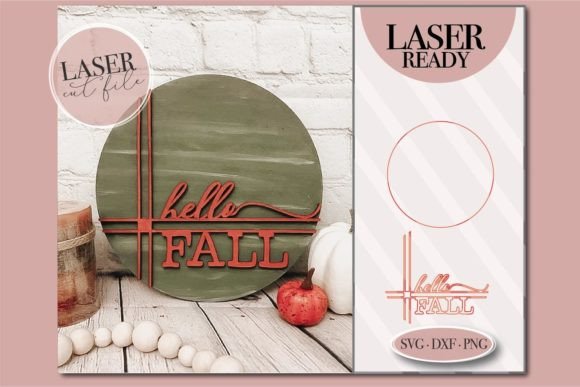
There's a special kind of magic in the air as the leaves begin to turn. The Hello Fall SVG Laser Cut File is a delightful design that captures the essence of this cozy season. This intricately crafted file welcomes the arrival of autumn with a warm and inviting message, adding a touch of seasonal charm to your space and projects.
This laser-cut design is a versatile tool that allows you to bring the spirit of fall into a wide range of creative endeavors. From creating beautiful seasonal signs and home decor to embellishing greeting cards, invitations, and party decorations, the possibilities are truly endless. Its clean lines and elegant composition make it a standout design asset for any maker or crafter.
A Design Asset for Every Autumn Project
Think beyond traditional paper crafts. This vector file is perfect for personalizing items and creating professional-looking merchandise. Imagine applying it to wooden signs for a farmhouse aesthetic, etching it onto acrylic for modern decor, or using it to create stunning appliques on textiles. The design's clarity ensures it looks sharp on everything from small gift tags to large wall hangings.
For digital creators, the file's versatility extends into the realm of graphic design. Use it as a central element in your social media graphics to announce seasonal sales or create engaging content. The aesthetic fits perfectly with autumn-themed branding, packaging design for small businesses, or even as a unique decorative element in a digital planner or editorial layout.
Seamless Compatibility and Creative Flexibility
This vector design is optimized for compatibility with popular laser cutting machines such as Glowforge, ensuring a smooth workflow from design to finished product. It can also be imported into Cricut Design Space or Silhouette Studio, making it accessible to a wide range of crafters and designers.
The listing includes a convenient ZIP file with the following formats:
- SVG - Ideal for scalable vector projects.
- DXF - For use with CAD and other cutting software.
- PNG - A high-resolution image for digital use or printing.
Tips for Choosing and Using Your Design Files
When selecting any creative asset, like a premium font or a design file, consider its intended use. Check the file's readability at the scale you plan to use it. Test how it pairs with other elements in your project, such as complementary fonts for accompanying text or patterns for backgrounds. Always review the license to ensure it fits your project's needs, whether for personal or commercial use.
The right design element can significantly improve visual consistency and professional presentation. A well-crafted file like this one helps unify your project's aesthetic, making your work look more polished and intentional. It saves you time on creating intricate designs from scratch, allowing you to focus on the bigger picture of your creative vision.
Choosing a thoughtfully designed asset is an investment in the quality and appeal of your final product. It elevates simple projects into something special, helping you create memorable items that resonate with the cozy, welcoming feeling of the autumn season. Happy crafting!